You are here: Annexes > List of KAS Literature > Installing KAS > Installing KAS Runtime on PAC Procedure

Installation Procedure

Install the KAS RuntimeIn computer science, runtime (or run-time) describes the operation of a computer program, the duration of its execution, from beginning to termination (compare compile time). Within KAS, runtime also refers to the virtual machine that manage the program written in a computer language while it is running software.

  1. Double-click the KAS-Setup.exe file to run the installation Wizard
  2. Click Run to launch the setup wizard
  3. Wait for the setup splash screen to vanish after being displayed
  4. The welcome wizard appears and show you the version and build number, click Next to continue the wizard
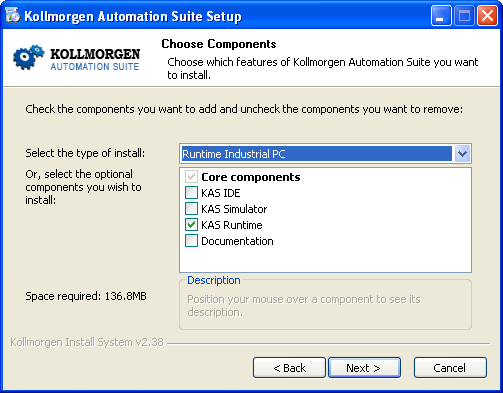
  5. In the drop-down menu, choose the type of installation to deploy: Run-time Industrial PCPersonal Computer
    Install Run-time for Industrial PC
  6. Figure 3-1: Install Run-time for Industrial PC

    (See the different Types of Deployment in Installing KAS IDE)

  7. Click Next to access the destination folder
  8. Select where you want to install KAS

    Kollmorgen strongly recommends accepting the default destination folder under C:\Program Files\Kollmorgen\Kollmorgen Automation Suite

  9. Keep the name proposed for the Start Menu Folder and click the Install button to install KAS
  10. You have to wait until the end of the process
  11. Wait until the installation is complete
  12. Click Finish


Stay Connected with Kollmorgen

Copyright © 2015 Kollmorgen™
